
Come where the slots meet the bingo games: the playful world of Jester's Diamonds. Keep an eye out for the Diamond Scatter, offering the chance to win up to x500 your total bet and dive into Free Spins with 125 ways to win. Let the playful Jester be your guide through this enchanting game, where hidden treasures are just waiting to be found!
Basic game rules
- 3x3 reels, all ways
- 27 ways to win in the main game, and 125 ways to win in Free Spins.
- All symbols pay left to right on 3 consecutive reels, except the Scatter symbol (Diamond).
- The Wild symbol (the Jester) substitutes for all symbols, except the Scatter and the Free Spin.
- The Scatter symbol can appear anywhere on the reels.
- Scatter Wins are added to way wins
- All payouts are made according to the paytable.
- Only the highest win is paid on each way.
- Coinciding or simultaneous wins in different combination are added to the balance
- In case of malfunction of the game, please contact customer support.
- Malfunction voids all pays and plays
- If the game is interrupted during the base game or the final free spin, the game will be finished in the background. It can be viewed in the game history table.
- RTP info:
|
Theor. RTP |
Simulation Avg RTP |
Out of No Spin |
| 90.94% | 89.91% | 15 000 000 |
- The above mentioned RTP is achieved though the number of spins mentioned by simulation
Winning patterns
• 3x3 reels in the main game, 3x5 in free spins. All ways
• 27 ways to win in the main game, and 125 ways to win in Free Spins.
• Any way in which an icon appears on the 1st reel, and then on the 2nd, and then the 3rd consecutively from left to right, is a valid win, without regard to paylines.
Special Features
In Game Jackpot Feature
Hitting 3 or more Scatter symbols trigger instant cash prizes up to x10,000 the total bet.
If the player gets 9 scatter symbols they hit the so called in game Jackpot (permenent multiplier) of 10 000 their bet
Free Spins bingo card bonus
Bingo card bonus - Free Spins
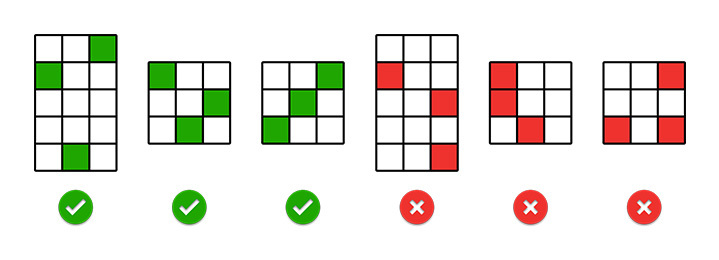
- The game reels have a dual function – as regular slot reels in the main game, and as a Bingo card for the Free Spin Bonus.
- Any FS icon that appears on the reels, marks that spot, and that marking remains on the screen in consecutive spins. You can keep spinning and marking spots on the reels/card with every spin you play (without changing the bet value).
- A combination of 3 Free Spin symbols in any Bingo line (row/column/diagonally) triggers 10 Free Spins.
- A combination of more than 1 line at the same time adds up to x3 multiplier to the Free Spins winnings (2 lines - wins are doubled, 3 lines - wins are tripled)
- Free Spins are played on a 5x3 reels. The frame expands, adding lines to the game revealing 125 ways to win. The payout for 3 of a kind Scatter in Free Spins game is x15 the total bet
- Your Free Spin winnings are added to the Total Win box.
- The Free Spins round is played with the same number of lines and bet, set by the player before triggering Free Spins
Buy Bonus Option
This option allows players to instantly purchase and activate a bonus feature, typically Free Spins. The chosen feature will activate on the next spin with a bet value equivalent to the one displayed in the ‘Bet’ field. If the game includes a progressive Jackpot, a 'Buy Bonus' purchase will contribute to and participate in the overall jackpot of the game.
- Player can buy 10 Free Spins
- Buy Bonus price is x40 total bet
- Buy Bonus RTP- 89.91%
Basic instructions
- Select the amount of your Bet.
- Click Play to spin the reels.
- If 3 or more identical icons appear on an any reel, you’ve won the cash prize as listed in the paytable.
- The amount won will pop up on the screen, and then be added to your account balance at the bottom of the screen.
- The total amount won for each game will appear in the Total Win field at the bottom of the screen and be added to your account balance.
- You can click Auto for the machine to play multiple random games for you with the same settings. You may stop this at any time by clicking on the Stop button
Slot Buttons (desktop)_EN BR
|
Game Buttons |
|
|
Main Game Screen Buttons and Fields |
|
|
|
Total Bet The total amount you are playing in this round. This is calculated by multiplying the number of pay lines played by the bet amount: Example: Number of pay lines = 5 Bet amount = 4 4 x 5 = 20 Total Bet = 20 |
|
|
Bet Select the amount of your bet per line. + Increases the amount of the bet - Decreases the amount of the bet |
|
|
Play Press the Play button to start the game. |
|
|
Turbo Play Click to play the game in Turbo mode. |
|
|
Stop Turbo Play Click to stop playing the game in Turbo mode. |
|
|
Auto play Enable the system to play a predefined number of rounds automatically without the need to click Play manually each time. |
|
|
Number of games Select the Auto button if you want the random, automated system to play multiple games for you with the same settings. (Stop this at any time by clicking the Stop AutoPlay button.) |
|
|
Stop Auto Play Click this button to stop playing in AutoPlay mode. Gameplay will stop at the end of the current round. The number of remaining rounds is displayed inside the button. |
|
|
Lines Shows the number of pay lines you are playing. Some of the games have the option of changeable lines. +Increases the amount of pay lines to play (for certain games only). - Decreases the amount of pay lines to play (for certain games only). Megaways games do not have lines and this is not relevant for them |
|
|
Total Win Displays the amount won in each game. |
|
|
Sound Click to turn the sound on / off. |
|
|
Music In certain games you can turn the music off separately |
|
Free Rounds Screen Fields |
|
|
|
Free Rounds Free rounds are actual spins you can play "on the house" without any cost to yourself. The counter will show how many rounds remain for you to play. |
|
|
Free Spins Field in games with free spins feature When you win a Free Spins Bonus, this counter will show how many Free Spins you have played and how many you have left. |
|
|
Free Spins / Free Rounds Win Field in games with Free Spins / Free Rounds features The amount won in the most recent spin. All your accumulated wins in the Free Spins feature are counted in the Total Win field |
|
|
Multiplier In some games, features have multipliers. The number by which all your winnings are multiplied in this bonus feature, in relation to the win value in the Paytable |
|
Other Buttons and Fields |
|
|
|
Game Rules Click to read the game rules for this game. |
|
|
Pay Table A list of all the Icons in the game, and how much they pay in each combination. |
|
|
Game History View the history of every round you played in the game. Either by video replay or a data table, you can see what bet you placed, what was the result of each round, and any winnings that may have occurred. |
|
|
Balance Your total balance amount (money you have deposited into your account). |


Slot Buttons (mobile)_EN BR
|
Game Buttons |
|
|
Main Game Screen Buttons and Fields |
|
|
|
Play Press the Play button to start the game. |
|
|
Total Bet The total amount you are playing in this round. Example: Number of pay lines = 5, Bet amount = 4. |
|
|
Total Win Displays the amount won in each game. |
|
Free Rounds Screen Fields |
|
|
|
Free Rounds Free rounds are actual spins you can play "on the house" without any cost to yourself. The counter will show how many rounds remain for you to play. |
|
|
Free Spins Field in games with Free Spins feature When you win a Free Spins Bonus, this counter will show how many Free Spins you have played and how many you have left. |
|
|
Free Spins / Free Rounds Win Field in games with Free Spins / Free Rounds features The amount won in the most recent spin. All your accumulated wins in the Free Spins feature are counted in the Total Win field |
|
|
MULTIPLIER In some games, features have multipliers. The number by which all wins in this bonus sequence are multiplied, relative to the amount of the win in the WinTable. |
|
Other Buttons and Fields |
|
|
|
Balance Your total balance amount (coins you have in your account). |
|
|
Menu Click the Menu button to view or change game settings. |
|
Game configurations buttons |
|
|
|
Bet Select the Bet amount per line. > Increase the play amount by sliding the switch to the right. < Decrease the play amount by sliding the switch to the left |
|
|
Lines Shows the number of winlines you are playing. Some of the games have the option of changeable lines. > Increases the number of win lines that can be played (for certain games only). < Decreases the number of win lines (only for certain games). Megaways games do not have lines and this is not relevant for them |
|
|
Lines Games with unchangeable lines Megaways games do not have lines and this is not relevant for them |
|
|
Turbo Play Game is playing in Turbo mode. (To stop playing in TurboPlay, click the menu button, select Play Settings and slide Turbo Play to the Off position.) Note: If you have both AutoPlay and Turbo on, pressing Stop AutoPlay will stop the AutoPlay feature only. |
|
|
Turbo On - Enable Turbo to make the game run faster. Disabled - Disable Turbo to play the game at default speed. |
|
|
Auto play Enable the system to play a predefined number of rounds automatically without the need to click Play manually each time. In games with Pick Bonus feature the system is going to select automatically on behalf of the player. |
|
|
Number of games Select the Auto button if you want the random, automated system to play multiple games for you with the same settings. (Stop this at any time by clicking the Stop AutoPlay button.) |
|
|
Stop Auto play Click this button to stop playing in Auto Play mode. Gameplay will stop at the end of the current round. The number of spins remaining is selected within the button. |
|
|
Sound Click to turn the sound on / off. |
|
|
Music In certain games you can turn the music off separately |
|
|
Home Exit the game and return back to the Game Lobby. |
|
|
Back button Takes you back to the game screen |
|
|
Close Close the manual and return to the game screen |


